How to track grocery prices from your receipts
Keep the receipt, check what you paid, and compare the same food over time. A practical guide to building a grocery price history with Harvenna.
The cheese was cheaper last time. You remember that much. Whether it was fifty cents cheaper, a smaller block, or a different brand is harder to say when you’re standing in front of the fridge at the supermarket.
To track grocery prices from your receipts, save each receipt, record the date and shop, check each item’s quantity and price, then compare repeat purchases of the same food. Keep pack sizes alongside the prices so a smaller packet doesn’t look like a saving.
You can do this in a notebook or spreadsheet. Harvenna takes the copying out of it: scan a receipt, review what it read, and confirm it to add the purchases to your price history. Receipt scanning and price history are on the Family plan.
Here’s a routine you can start with your next shop. The screenshots show Harvenna on iPhone with sample Coles receipts. The purchases and prices are illustrative, not a record of current Coles prices.
1. Keep the receipt before it disappears
Photograph the receipt while you’re unpacking. Flatten the folds, put it somewhere well lit, and include the shop name, purchase date, item lines and total. Check that the small print is readable before putting the paper away.
The total alone won’t answer an item-price question. A $140 shop might contain more food than last week’s $120 shop, or it might contain the same food at higher prices. You need the individual lines to tell those stories apart.
If you’re tracking by hand, start with five or ten things you buy regularly: milk, oats, eggs, bread, cheese. For each purchase, keep:
- The date and shop.
- The food and brand, where it matters to your comparison.
- How many packs you bought and how much each pack contains.
- What you paid for that item, including any clearly identifiable discount.
Keep the receipt photo too. It gives you something to check when a number looks odd later. A receipt may not print a pack size, so photograph the packet while you still have it if you want to compare prices by weight or volume.
2. Scan it in Harvenna
Open Spend, then tap the receipt-scanning icon at the top of the screen, labelled Add receipt. To use a photo you’ve already taken, choose Choose from library and select the receipt image. Harvenna reads it and opens the receipt for review. Scanning needs an internet connection, so you can photograph the receipt at the shops and read it into Harvenna once you’re home.
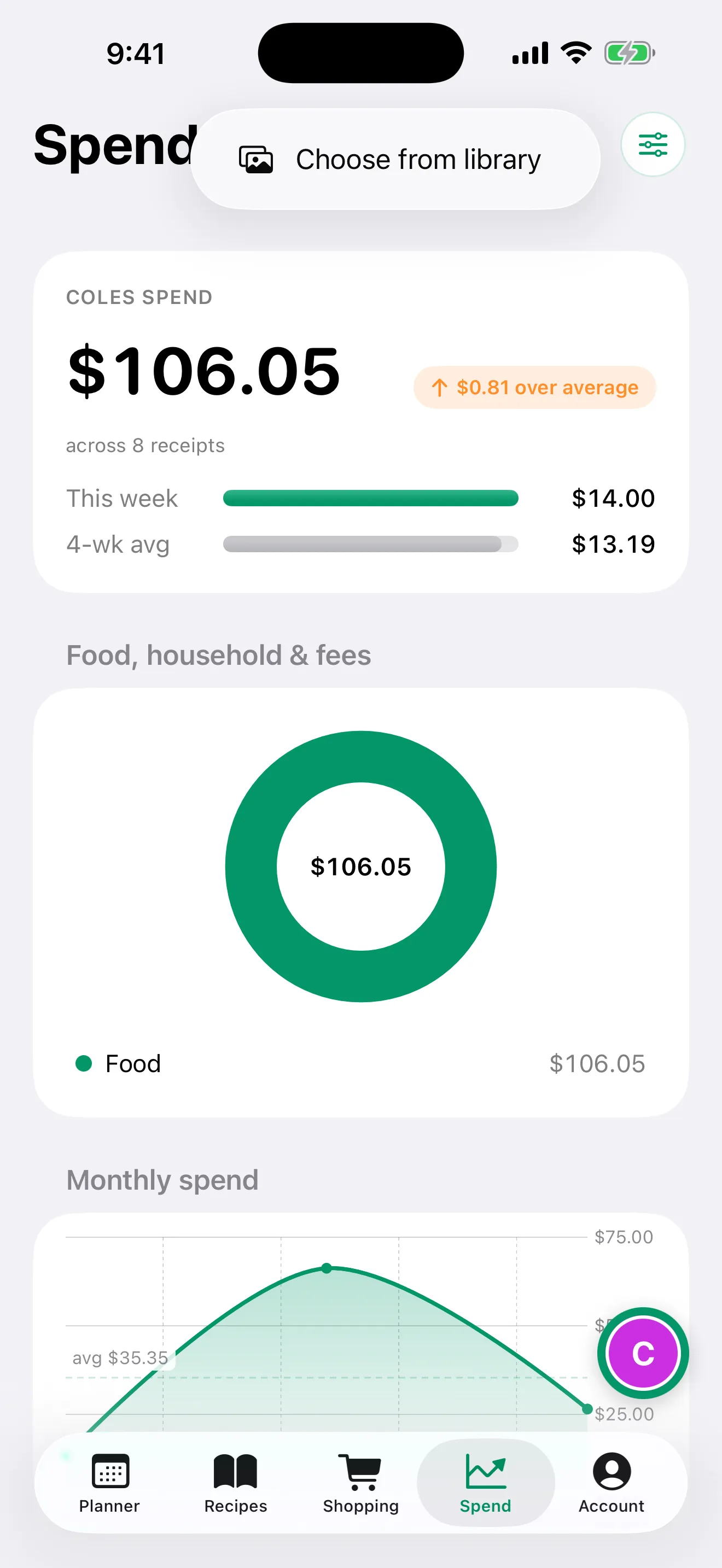
In Spend, open Add receipt and choose a saved receipt photo from your library.
Don’t expect a crumpled strip of paper to read perfectly every time. An abbreviated product name, faint decimal point or discount on a separate line can need attention. The next step is part of the routine, not something to skip because the scan finished.
3. Check the receipt before confirming
Compare the result with the original receipt. Start with the shop and purchase date, then look through the food names, quantities and prices. Check any warning the review screen shows, and tap a line to correct anything that was read incorrectly.
Pay particular attention when you bought more than one of something. Two blocks of cheese for $14 are not evidence that one block costs $14. Likewise, a discount or checkout fee shouldn’t become a food you supposedly bought.
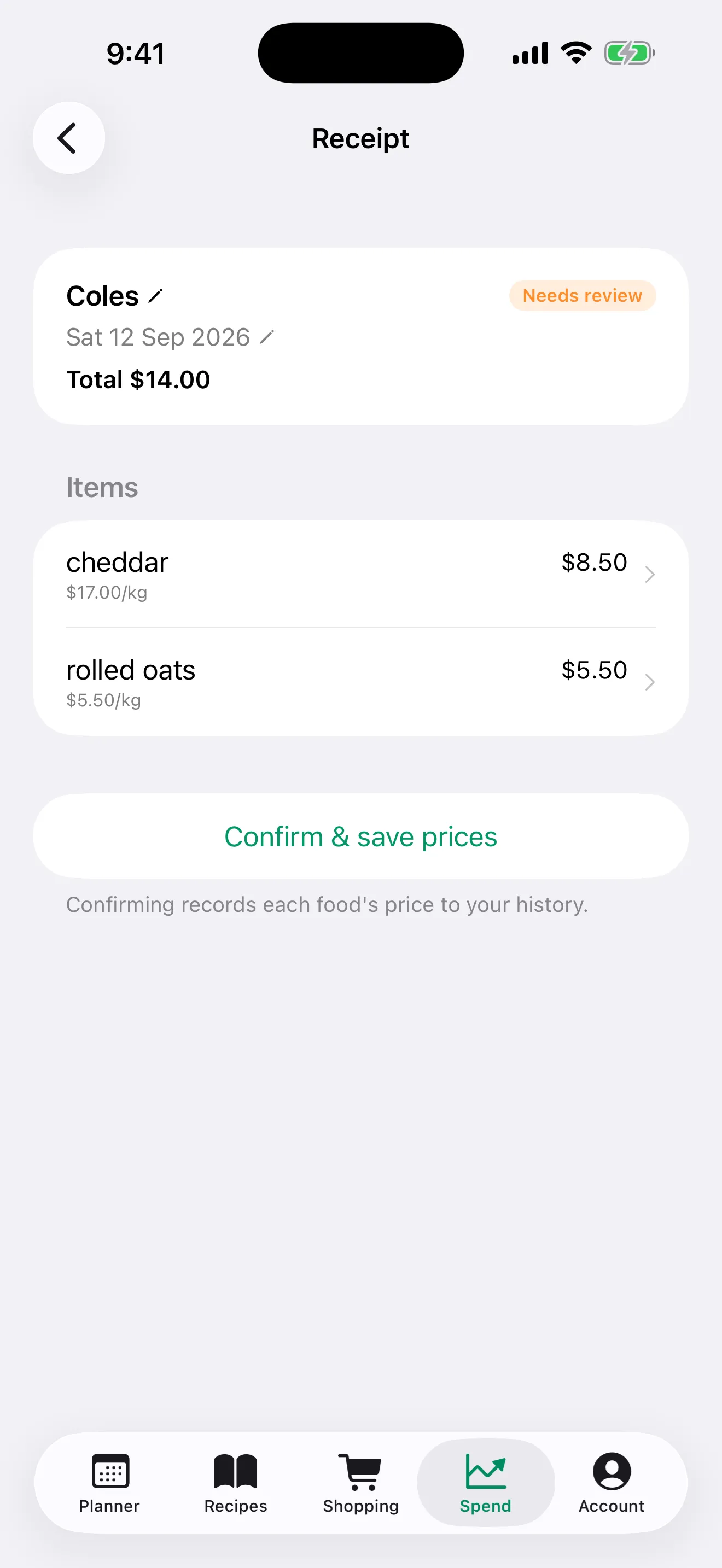
Example purchases: one 500g cheddar at $8.50 and one 1kg bag of rolled oats at $5.50. Confirming records each item’s price in the history.
Tap Confirm & save prices once the receipt is right. In Harvenna, confirmation is what records the item prices. An unconfirmed receipt hasn’t done that job yet, even if you can see it in your receipt list.
This is the small bit of work that makes the history worth trusting. A checked receipt now is more useful than a beautiful chart you have to explain away later.
4. Compare repeat purchases of the same food
One receipt gives you a starting point. The next few give you a comparison. In Harvenna’s Spend screen, scroll to Top spends and tap a food to open its price history. The chart shows the recorded prices over time, with the latest, lowest and highest prices and number of records beneath it. Drag across the chart to read a purchase’s date, price and shop.
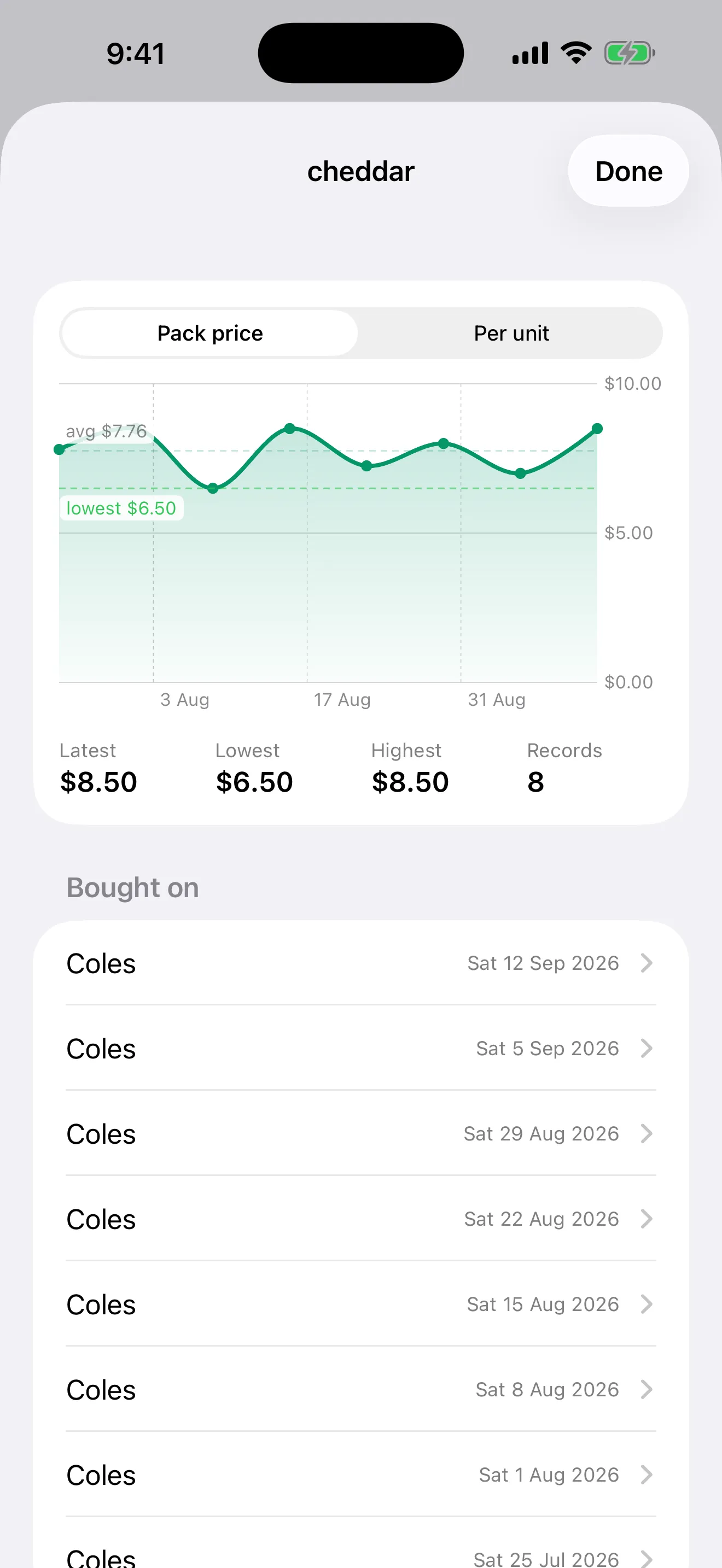
Eight sample weekly purchases of the same 500g cheddar, with specials and returns to a higher price. The latest pack costs $2.00 more than the lowest recorded pack.
That gives you a useful reference for the next shop. If the shelf says $8.00, it’s below your latest $8.50 purchase but above the $6.50 you’ve paid before. Both facts matter more than the colour of the special sticker.
Check the date and shop behind a price too. Your history describes purchases you’ve recorded. It isn’t a live catalogue of supermarket prices, and the lowest price you’ve paid doesn’t mean that price is available today.
Keep comparisons sensible. A premium cheese and a basic cheddar may fill the same sandwich, but switching between them isn’t evidence that the price of either has changed.
5. Check pack sizes before calling it cheaper
A 500g block at $8.50 costs $17 per kilogram. A 400g block at $7.60 costs $19 per kilogram. The smaller block costs less at the checkout and more for the amount of cheese you get.
For a manual comparison, divide the price by the weight in kilograms or volume in litres. Use the same measure on both purchases. For eggs, comparing the price per egg can help, while remembering that egg sizes differ too.
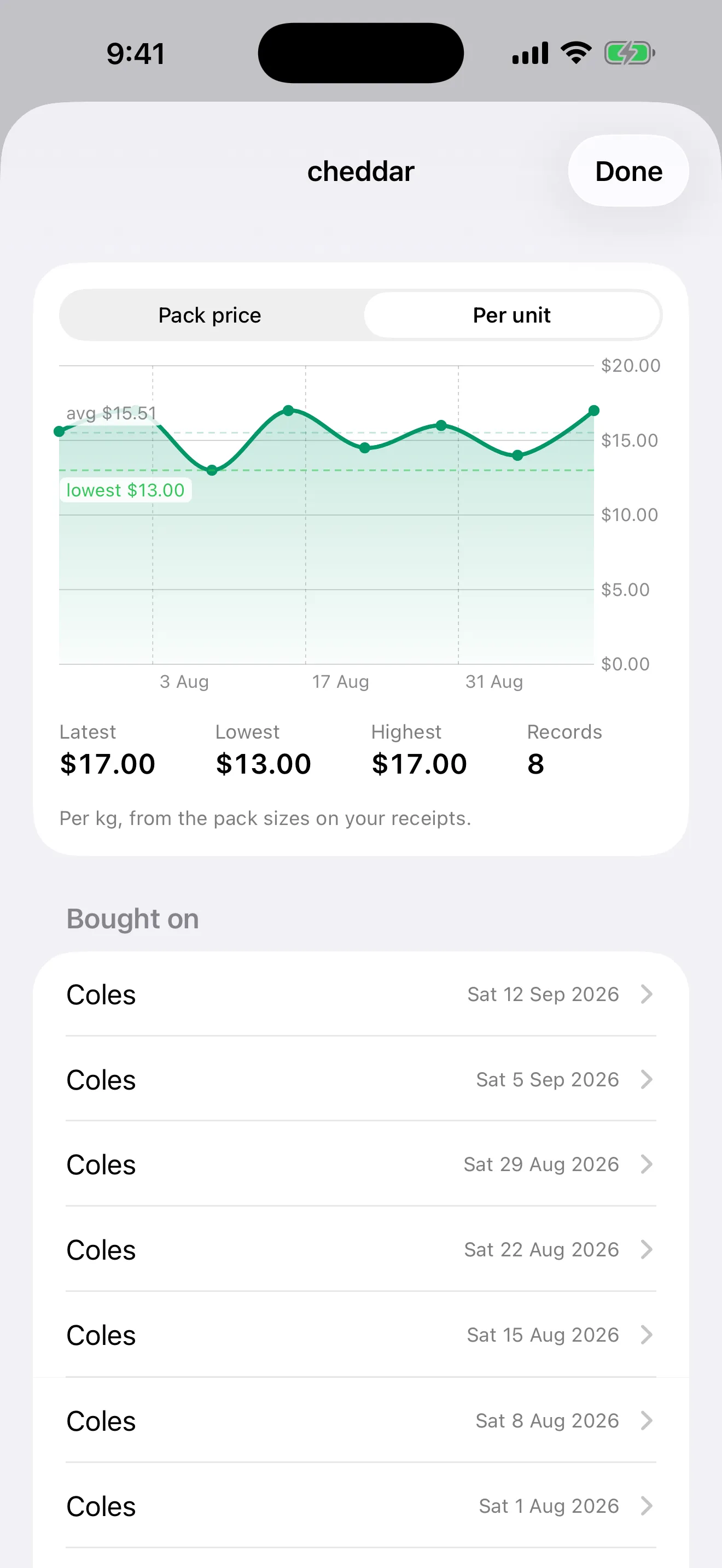
The same example cheddar history viewed per kilogram instead of per pack.
Harvenna offers Pack price and Per unit views when the recorded information supports a comparable unit price. If a receipt doesn’t provide enough size information, don’t treat a pack-price chart as proof that the amount you’re getting stayed the same. Check the packet or shelf label as well.
6. Use the history for one decision next week
You don’t need to review every grocery line every Sunday. Start with an item you buy often or spend a lot on. Check its recent prices before you write the next shopping list.
Perhaps you wait a week for cheese because there’s still half a block at home. Perhaps you choose a different dinner because the meat you usually buy has become dearer. Perhaps you buy the usual amount anyway, with a better idea of what the shop will cost.
A low price only helps if you use what you buy. Two discounted bags of salad that go soft in the crisper aren’t cheaper than one bag you finish. For more ways to turn the numbers into practical changes, read how to cut the grocery bill without eating worse.
Keep scanning consistently, including the small top-up shops. Missing receipts leave gaps; a handful of purchases is a starting point, not a complete picture of your household’s shopping. The useful history builds as you repeat the routine.
Start with your next receipt
Keep it, scan it, check it, confirm it. Then come back to one food you’ve bought before. That is enough to begin replacing “I think it used to be cheaper” with an actual comparison.
Download Harvenna on the App Store for iPhone and iPad. Receipt scanning, price history, price insights and spend analytics are on the Family plan.
Harvenna turns your confirmed grocery receipts into a price history for the food you actually buy.